Vehicle reports online: diagnostics, inspections and PDFs
Turn your findings into a clear customer report. Choose the inspection type, enter the vehicle details and photos, then review the document and download a PDF or share it through WhatsApp.
For mechanics, vehicle inspectors, detailers, workshops, fleets and vehicle owners who need to document an inspection.
Choose the inspection you perform
Vehicle report and workshop form templates
Diagnostics and inspections
Pre-inspection preparation
Work through the preparatory checks — visibility, lighting, identity, brakes, suspension — and hand the customer a report showing exactly what would fail the official inspection.
View contents and exampleEmissions test preparation
Record confirmed, pending and permanent DTCs, the monitor readiness and the MIL state, then give the driver a PDF showing exactly what is still missing before the smog test.
View contents and exampleOBD diagnostics
Bring scanner codes, symptoms and completed checks into one vehicle report. Enter the information or import codes from a scanner photograph, review your findings and generate the PDF.
View contents and examplePre-purchase inspection
Work through checks by area and record what is satisfactory, what needs attention and what could not be checked. The buyer receives a PDF with the findings and the questions still open.
View contents and exampleVehicle repaired after damage
Keep declared history separate from actual structural and restraint-system findings. Document completed checks, inaccessible areas and the investigations still needed.
View contents and exampleEV and hybrid battery
Record available test-equipment results alongside the method, charge level and conditions. The customer receives a document explaining where the readings came from and what they can establish.
View contents and exampleService and maintenance
Workshop — intake and delivery
Record the vehicle condition at intake, attach photos and capture the customer signature, then send the PDF on WhatsApp. The work order and mileage stay in the workshop history.
View contents and exampleAir conditioning — service and measurements
Record the recovered and charged refrigerant, the pressures, the vacuum duration and the vent temperature. The customer receives a PDF proving the system actually cools.
View contents and exampleTyres — change, inspection and storage
Record the DOT code, tread depth, pressure and storage position for every wheel. The customer receives a sheet showing what was left and what was collected, without a paper register.
View contents and exampleService, brakes and alignment
Oil, filters, brake measurements and the alignment adjustment go into one report the customer keeps. At the next service you start from the vehicle history.
View contents and exampleIndicative repair estimate
Add proposed operations, parts costs and labour to the vehicle technical report. The customer can see what the estimate includes and what still needs confirming before work starts.
View contents and exampleBrakes and suspension
Record measured disc and pad thickness, joint observations and brake fluid test results. Keep specification sources alongside the checks actually performed.
View contents and exampleBody and paint repair
Record affected panels and propose work and painting for each one. Separate visible observations from structural assessment and state what needs further inspection.
View contents and exampleWheel alignment
Enter measured angles by position, readings after the work and limits from the reference used. The PDF keeps the test conditions and operations performed.
View contents and exampleDiesel DPF / EGR
Keep scan-tool values (soot, differential pressure, injector corrections, boost), the work done and recommendations in one report.
View contents and exampleTiming kit
Record the kit fitted, water pump, timing and tension checks, and when the next replacement is due.
View contents and exampleClutch / gearbox
Show the customer what you found on removal: disc wear, plate, bearing, dual-mass flywheel and leaks, with photos.
View contents and exampleBattery test
Record measured CCA, state of health, cranking and charging voltage, with a clear result: good, charge or replace.
View contents and exampleSeasonal check
A short checklist for seasonal campaigns: tyres, battery, coolant, wipers, lights, brakes and heating or AC.
View contents and exampleLPG check
Record the tank and its expiry, the leak test, component condition, filters replaced and calibration.
View contents and exampleParts warranty
List fitted parts, supplier, invoice, part and labour warranty and terms in a document the customer keeps.
View contents and exampleFleet and rental
Fleet / rental — handover and return
Photograph the car at every handover, record mileage, fuel level and damage, and capture the driver signature on screen. At return you compare against the very same sheet.
View contents and examplePeriodic fleet inspection
Document vehicle checks and who follows up each concern. Record defect status, responsibility and target date, keeping the context available in a PDF for the next inspection.
View contents and exampleDaily pre-use vehicle check
Record the check at the start of a day or shift and any defects observed. The sheet keeps the driver, inspection time and vehicle-use decision status available to the fleet custodian.
View contents and exampleSales and detailing
Detailing — paint and intake
Measure every panel with a thickness gauge, record the microns and paint condition, then hand the customer a PDF with the values, photos and intake signature.
View contents and exampleVehicle sale inspection
Record observed vehicle condition, marked body areas and relevant photographs. The sheet provides a written starting point for a discussion between seller and buyer.
View contents and exampleDocument example · AI Mechanic
See the updated AI analysis: driver summary, probable causes, clarifications and workshop handoff. Free fictional example, no account needed.
See what you get before paying
Full example report and free PDF, no account needed.
From scanner photo to a PDF report
- 25 report types: diagnostics, used-car inspection, service, brakes, tyres, AC, diesel DPF/EGR, timing belt, clutch, battery, seasonal check, LPG, parts warranty and more
- On paid reports: your workshop logo and colours, your own numbering, saved signature and stamp
- OBD codes entered manually or extracted from a scanner photo and confirmed by you
- Photos and measurements linked to findings and body panels
- Sections chosen for each inspection, an indicative estimate and on-screen signature
- Report country, language, currency and measurement units suited to the customer
Mobile · PDF · multiple languages
Fictional data · demonstration example
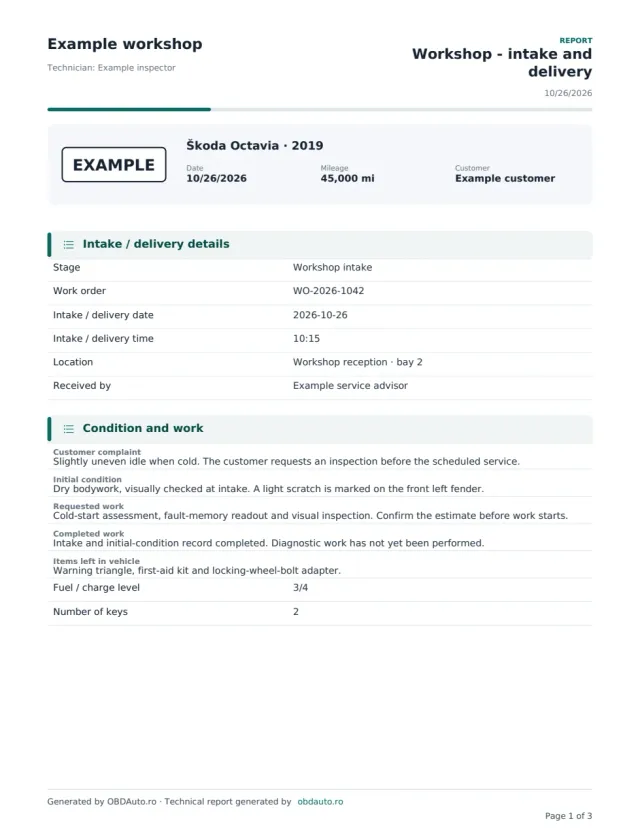
OBDAuto · Complete example
Intake sheet
Škoda Octavia · 2019 · EXAMPLE
DEMO · Fictional data and illustrative photos.
How to create a report
- 1
Choose a report type and enter the vehicle, country and document language.
- 2
Record real findings, measurements and photos. Check any codes imported from a scanner image.
- 3
Select the relevant sections, review the report and generate the customer PDF.
Start free. Get AI Mechanic with PRO.
PRO plans include AI Mechanic and unlimited reports. PRO Workshop adds team collaboration and workshop management. Searching the fault-code catalogue stays free.
Pricing country: United States · USD. Change the country and currency in the “Language and region” menu.
Universal credits (no monthly subscription)
1 UNIVERSAL CREDIT
US$1.99
US$1.99 / report
- 1 report of your choice
- Credits never expire
- 1 credit = 1 AI analysis or PDF report
- PDF export and sharing
- For a one-off inspection
5 UNIVERSAL CREDITS
US$6.99
US$1.40 / report
Save 30%
- 5 reports of your choice
- Credits never expire
- 1 credit = 1 AI analysis or PDF report
- PDF export and sharing
- For multiple inspections
15 UNIVERSAL CREDITS
US$14.99
US$1.00 / report
Save 50%
- 15 reports of your choice
- Credits never expire
- 1 credit = 1 AI analysis or PDF report
- PDF export and sharing
- For dealers and frequent use
Secure payment using available checkout methods (card and eligible digital wallets). Credits are granted after payment confirmation. Existing purchased credits can also be used for AI Mechanic.
FREE
0 USD / month
5 free reports every month
For occasional inspections and getting started with reports.
- OBD diagnostics, inspection, photos and estimate
- PDF export and WhatsApp sharing
- History of your saved reports
- PDF marked “Generated by OBDAuto.ro”
The allowance is per account and resets at the start of each calendar month. No card is required for the free plan.
Create a free accountPRO Reports
USD 14.99 / month
Save USD 50.88 (28.29%)
12 monthly payments: USD 179.88 (12 × USD 14.99)
Annual payment: USD 129
✨ AI Mechanic for you
AI Mechanic for interpreting codes and symptoms, clear explanations and prioritised checks. For one user.
- 1 user · personal workspace
- All report types, with no monthly report limit
- PDF reports without OBDAuto advertising
- VIN scanning and code import from photos
- Reports with your logo and details: style, colour, your own numbering, saved signature and stamp
- Your own closing message, terms and IBAN on every report
Choose monthly or yearly billing in your account. Yearly billing is charged in full. Automatic renewal; cancel renewal in the portal.
View PRO ReportsPRO Workshop
USD 34.99 / month
Save USD 120.88 (28.79%)
12 monthly payments: USD 419.88 (12 × USD 34.99)
Annual payment: USD 299
✨ AI Mechanic for your team
AI Mechanic for interpreting codes and symptoms, clear explanations and prioritised checks. For workshops and teams.
- Up to 100 users, including the owner
- All report types, with no monthly report limit
- PDF reports without OBDAuto advertising
- VIN scanning and code import from photos
- Reports with your logo and details: style, colour, your own numbering, saved signature and stamp
- Your own closing message, terms and IBAN on every report
- The same look on handovers/returns, DVI inspections and the AI report
Plus: workshop and team management
- Shared team reports and history, with roles for each member
- Central work order: intake, diagnostics, estimate, photos and delivery
- Individual work and recommendations with priority, progress and notes
- Work statuses including awaiting approval and awaiting parts
- Pre-purchase comparison: asking price, valuation and manually entered estimated repair cost
- Reports with your workshop logo: style, colour, numbering, saved signature and stamp, the same look on every PDF
- Handovers and returns with signatures, photos per defect, PDF sent on WhatsApp and AI photo comparison (50/month)
- Estimate approval by link with the version and response date recorded
- Customer records, vehicles and intervention history
- Deferred work and return visits: due dates, estimated values, stages and rebooking
- Customer page without an account: status, estimate, approval and selected photos/reports through a revocable link
- Appointments with day/week/month views, assigned person and duration
- Convert appointments to work orders without entering the details again
- ZIP export of PDFs by period or customer — up to 100 reports per archive, for owners and administrators
Choose monthly or yearly billing in your account. Yearly billing is charged in full. Automatic renewal; cancel renewal in the portal.
View PRO WorkshopFrequently asked questions
What is included in PRO Atelier?
AI-assisted OBD diagnostics: up to 100 analyses/month shared across the workshop. Central work order: intake, diagnostics, estimate, photos and delivery. Individual work and recommendations with priority, progress and notes. Work statuses including awaiting approval and awaiting parts. Pre-purchase comparison: asking price, valuation and manually entered estimated repair cost. Reports with your workshop logo: style, colour, numbering, saved signature and stamp, the same look on every PDF. Handovers and returns with signatures, photos per defect, PDF sent on WhatsApp and AI photo comparison (50/month). Estimate approval by link with the version and response date recorded. Customer records, vehicles and intervention history. Deferred work and return visits: due dates, estimated values, stages and rebooking. Customer page without an account: status, estimate, approval and selected photos/reports through a revocable link. Appointments with day/week/month views, assigned person and duration. Convert appointments to work orders without entering the details again. ZIP export of PDFs by period or customer — up to 100 reports per archive, for owners and administrators. Workshop features require an active PRO Atelier plan.
How is a referral identified?
Your personal link connects the new account to the person who invited them. Your friend must open the link and create their account in the same browser. After registration, they can purchase a subscription from any device. After their first subscription payment, you receive 25 reports on the free plan or credit worth one month of your own PRO or PRO Atelier plan, based on your plan at that time. Credit reduces future invoices; for annual plans it equals 1/12 of the annual price and applies at renewal. Existing accounts are not eligible.
Is this a VIN vehicle history report?
This tool documents the checks and findings you enter. It does not provide a complete accident or mileage history and does not certify the vehicle condition.
Can I create a report on my phone?
Yes. Complete the form in your browser, add photos, review the preview and download the PDF. Creating and saving reports requires an account.
Can I send a report to a customer abroad?
Yes. Choose the report language and country separately. Preparatory checks do not replace official inspections or local requirements.
Will customer details appear in Google?
Marketing pages and fictional examples are public. Account pages and report links are configured noindex. A shared link can be accessed by its recipients; excluding it from search is not access control.